Maven - 构建自动化
构建自动化定义了这样的场景:一旦项目构建成功完成,依赖项目的构建过程就会自动启动,以确保依赖项目保持稳定。
示例 - 构建自动化
假设一个团队正在开发项目 bus-core-api,另外两个项目 app-web-ui 和 app-desktop-ui 依赖于它。
app-web-ui 项目使用 bus-core-api 项目的 1.0-SNAPSHOT 版本。
<project xmlns = "http://maven.apache.org/POM/4.0.0"
   xmlns:xsi = "http://www.w3.org/2001/XMLSchema-instance"
   xsi:schemaLocation = "http://maven.apache.org/POM/4.0.0
   http://maven.apache.org/xsd/maven-4.0.0.xsd">
   <modelVersion>4.0.0</modelVersion>
   <groupId>app-web-ui</groupId>
   <artifactId>app-web-ui</artifactId>
   <version>1.0</version>
   <packaging>jar</packaging>
   <dependencies>
      <dependency>
         <groupId>bus-core-api</groupId>
            <artifactId>bus-core-api</artifactId>
            <version>1.0-SNAPSHOT</version>
      </dependency>
   </dependencies>
</project>
app-desktop-ui 项目使用 bus-core-api 项目的 1.0-SNAPSHOT 版本。
<project xmlns = "http://maven.apache.org/POM/4.0.0"
   xmlns:xsi = "http://www.w3.org/2001/XMLSchema-instance"
   xsi:schemaLocation = "http://maven.apache.org/POM/4.0.0
   http://maven.apache.org/xsd/maven-4.0.0.xsd">
   <modelVersion>4.0.0</modelVersion>
   <groupId>app_desktop_ui</groupId>
   <artifactId>app_desktop_ui</artifactId>
   <version>1.0</version>
   <packaging>jar</packaging>
   <name>app_desktop_ui</name>
   <url>http://maven.apache.org</url>
   <properties>
      <project.build.sourceEncoding>UTF-8</project.build.sourceEncoding>
   </properties>
   <dependencies>
      <dependency>
         <groupId>junit</groupId>
         <artifactId>junit</artifactId>
         <version>3.8.1</version>
         <scope>test</scope>
      </dependency>
      <dependency>
         <groupId>bus_core_api</groupId>
         <artifactId>bus_core_api</artifactId>
         <version>1.0-SNAPSHOT</version>
         <scope>system</scope>
         <systemPath>C:\MVN\bus_core_api\target\bus_core_api-1.0-SNAPSHOT.jar</systemPath>
      </dependency>
   </dependencies>
</project>
bus-core-api 项目 −
<project xmlns = "http://maven.apache.org/POM/4.0.0"
   xmlns:xsi = "http://www.w3.org/2001/XMLSchema-instance"
   xsi:schemaLocation = "http://maven.apache.org/POM/4.0.0
   http://maven.apache.org/xsd/maven-4.0.0.xsd">
   <modelVersion>4.0.0</modelVersion>
   <groupId>bus_core_api</groupId>
   <artifactId>bus_core_api</artifactId>
   <version>1.0-SNAPSHOT</version>
   <packaging>jar</packaging>
</project>
现在,app-web-ui 和 app-desktop-ui 项目团队要求,每当 bus-core-api 项目发生变化时,它们的构建过程就应该自动启动。
使用 snapshot 可以确保使用最新的 bus-core-api 项目,但要满足上述要求,我们需要做一些额外的工作。
我们可以通过以下两种方式来实现 −
在 bus-core-api 的 pom 中添加一个 post-build goal 来触发 app-web-ui 和 app-desktop-ui 的构建。
使用 Continuous Integration (CI) 服务器如 Hudson 来自动管理构建自动化。
使用 Maven
更新 bus-core-api 项目的 pom.xml。
<project xmlns = "http://maven.apache.org/POM/4.0.0"
   xmlns:xsi = "http://www.w3.org/2001/XMLSchema-instance"
   xsi:schemaLocation = "http://maven.apache.org/POM/4.0.0
   http://maven.apache.org/xsd/maven-4.0.0.xsd">
   <modelVersion>4.0.0</modelVersion>
   <groupId>bus-core-api</groupId>
   <artifactId>bus-core-api</artifactId>
   <version>1.0-SNAPSHOT</version>
   <packaging>jar</packaging>
   <build>
      <plugins>
         <plugin>
         <artifactId>maven-invoker-plugin</artifactId>
         <version>1.6</version>
         <configuration>
            <debug>true</debug>
            <pomIncludes>
               <pomInclude>app-web-ui/pom.xml</pomInclude>
               <pomInclude>app-desktop-ui/pom.xml</pomInclude>
            </pomIncludes>
         </configuration>
         <executions>
            <execution>
               <id>build</id>
               <goals>
                  <goal>run</goal>
               </goals>
            </execution>
         </executions>
         </plugin>
      </plugins>
   <build>
</project>
打开命令控制台,进入 D:\Projects\MVN\bus-core-api 目录,并执行以下 mvn 命令。
>mvn clean package -U
Maven 将开始构建 bus-core-api 项目。
[INFO] Scanning for projects...
[INFO] ------------------------------------------------------------------
[INFO] Building bus-core-api
[INFO] task-segment: [clean, package]
[INFO] ------------------------------------------------------------------
...
[INFO] [jar:jar {execution: default-jar}]
[INFO] Building jar: C:\MVN\bus-core-ui\target\
bus-core-ui-1.0-SNAPSHOT.jar
[INFO] ------------------------------------------------------------------
[INFO] BUILD SUCCESSFUL
[INFO] ------------------------------------------------------------------
bus-core-api 构建成功后,Maven 将开始构建 app-web-ui 项目。
[INFO] ------------------------------------------------------------------
[INFO] Building app-web-ui
[INFO] task-segment: [package]
[INFO] ------------------------------------------------------------------
...
[INFO] [jar:jar {execution: default-jar}]
[INFO] Building jar: C:\MVN\app-web-ui\target\
app-web-ui-1.0-SNAPSHOT.jar
[INFO] ------------------------------------------------------------------
[INFO] BUILD SUCCESSFUL
[INFO] ------------------------------------------------------------------
app-web-ui 构建成功后,Maven 将开始构建 app-desktop-ui 项目。
[INFO] ------------------------------------------------------------------
[INFO] Building app-desktop-ui
[INFO] task-segment: [package]
[INFO] ------------------------------------------------------------------
...
[INFO] [jar:jar {execution: default-jar}]
[INFO] Building jar: C:\MVN\app-desktop-ui\target\
app-desktop-ui-1.0-SNAPSHOT.jar
[INFO] -------------------------------------------------------------------
[INFO] BUILD SUCCESSFUL
[INFO] -------------------------------------------------------------------
使用持续集成服务与 Maven
对开发者来说,使用 CI Server 更为可取。它无需每次添加新项目(例如 app-mobile-ui)作为 bus-core-api 项目的依赖项目时,都更新 bus-core-api 项目。Hudson 是一个用 Java 编写的持续集成工具,它运行在 servlet container 中,例如 Apache Tomcat 和 GlassFish 应用服务器。Hudson 使用 Maven 依赖管理自动处理构建自动化。下面的快照将定义 Hudson 工具的作用。
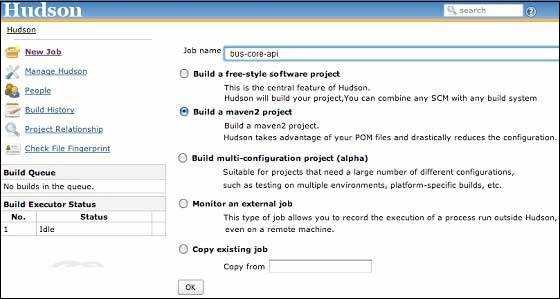
Hudson 将每个项目构建视为 job。一旦项目代码被签入到 SVN(或任何映射到 Hudson 的源代码管理工具),Hudson 就会启动其构建 job,一旦该 job 完成,它会自动启动其他依赖 job(其他依赖项目)。
在上例中,当 bus-core-ui 源代码在 SVN 中更新时,Hudson 会启动其构建。一旦构建成功,Hudson 会自动查找依赖项目,并启动 app-web-ui 和 app-desktop-ui 项目的构建。