JavaScript - 原生原型
原生原型
JavaScript 中的原生原型是 Object.prototype 对象的属性。原型是对象之间继承特性的机制。
在 JavaScript 中,每个对象都包含 prototype 属性。每个对象的 prototype 包含与该对象相关的 methods 和 properties。因此,它也被称为 原生原型。
但是,你可以更新或向原生原型对象添加新的 methods 和 properties,但不能删除已存在的。
理解 JavaScript 对象和对象构造函数是理解 JavaScript 原生原型的主要前提。
语法
你可以使用以下语法访问对象的原生原型。
Object.prototype;
在上述语法中,object 可以是任何 JavaScript 对象。
示例:访问数组的原型
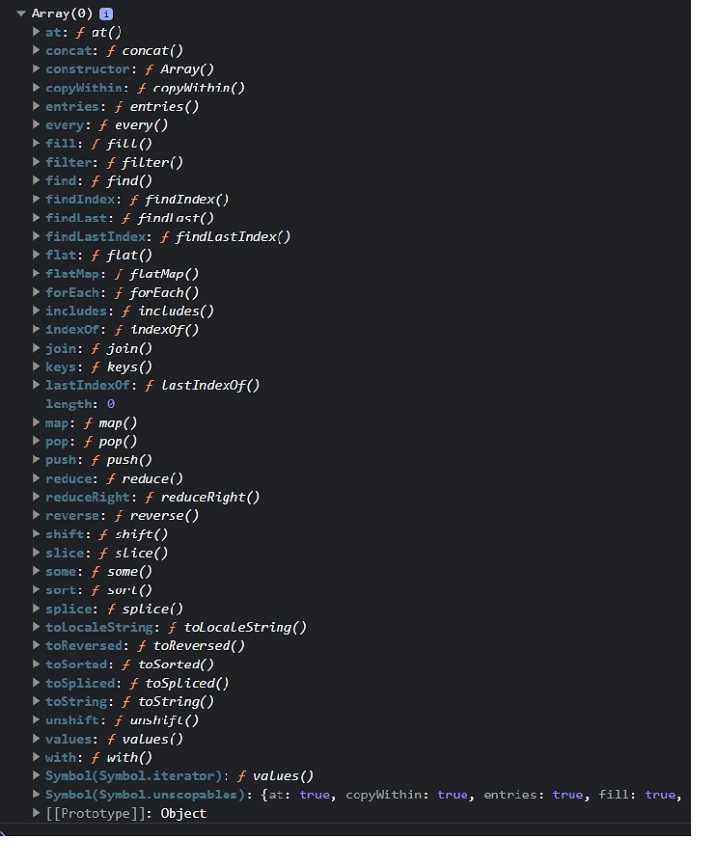
每当你在浏览器中执行以下代码时,它会在浏览器控制台中打印数组的原型。同样,你可以检查其他对象的原型。
在控制台中,你可以看到原型对象包含可以与 array methods 一起使用的 methods。
<html>
<body>
	<script>
		console.log(Array.prototype);
	</script>
	<p>Please open the web console before executing the above program.</p>
</body>
</html>
输出
运行上述程序后,你将在 web 控制台中看到类似于以下截图的结果 −
更新原生原型
你可以更新原生原型对象的现有 method 或 property,或者向原生原型对象添加新的 method 或 property。
语法
你可以使用以下语法向原型对象更新或添加新的 properties 或 methods。
objName.prototype.name = value
在上述语法中,objName 是你需要更新的原型的对象。
'name' 是 method 或 property 的名称。你可以为 'name' 赋值新值或 function expression。
示例:更新字符串对象的 toLowerCase() method 的原型
String 对象的原型包含 toLowerCase() method。这里,我们更新了 toLowerCase() method。
更新后的 toLowerCase() method 返回大写的字符串。在输出中,你可以观察到大写的字符串。
通过这种方式,你可以更新对象的内置 methods 的功能。
<html>
<body>
	<p id = "output">After updating the string.toLowerCase() method: </p>
	<script>
		String.prototype.toLowerCase = function () {
			return this.toUpperCase();
		}
		let str = "Hello World";
		document.getElementById("output").innerHTML += str.toLowerCase();
	</script>
</body>
</html>
输出
After updating the string.toLowerCase() method: HELLO WORLD
你不应该更新原生原型对象的 methods 和 properties。但是,你可以添加新的,如以下示例所示。
示例:向原型对象添加新 method
你也可以向 Object 原型添加新 method。这里,我们在对象原型中添加了 firstCase() method。
firstCase() method 将字符串的首字符转换为大写后返回字符串。
<html>
<body>
   <p id = "output">After executing the string.firstCase() method: </p>
   <script>
		String.prototype.firstCase = function () {
			// First character in uppercase. Other characters in lowercase.
			// 首字符大写。其余字符小写。
			return this.charAt(0).toUpperCase() + this.slice(1).toLowerCase();
		}
		let str = "hello world";
		document.getElementById("output").innerHTML += str.firstCase();
	</script>
</body>
</html>
输出
After executing the string.firstCase() method: Hello world
为构造函数添加方法
每当你使用构造函数定义一个对象时,你不能通过其实例向构造函数添加方法或属性。因此,你需要将方法添加到构造函数的 prototype 上。这样,它就可以通过该对象的所有实例访问。
示例
在下面的示例中,Person() 是一个构造函数,用于初始化对象属性。
之后,我们将 display() 方法添加到 person() 函数的 prototype 上。
接下来,我们创建了 Person() 函数的两个实例,并使用 display() 方法调用它们。因此,添加到对象构造函数 prototype 中的方法和属性可以通过构造函数的所有实例访问。
<html>
<body>
   <p id = "demo"> </p>
	<script>
		const output = document.getElementById("demo");

		function Person(id, name) {
			this.id = id;
			this.name = name;
		}
		Person.prototype.display = function () {
			output.innerHTML += this.id + ", " + this.name + "<br>";
		}
		const p1 = new Person(1, "James");
		const p2 = new Person(2, "Nayan");
		p1.display();
		p2.display();
	</script>
</body>
</html>
输出
1, James
2, Nayan
对象的所有实例都会从其父级 prototype 继承属性和方法。
JavaScript Prototype Chaining
简单来说,你可以说 prototype 存储了属性的默认值。如果对象构造函数及其 prototype 包含相同的属性,则代码会覆盖 prototype 的属性值。
示例
在下面的代码中,Person() 函数包含 name 属性。我们在函数的 prototype 中添加了 name 和 age 属性。
我们使用 Person() 构造函数创建了 p1 对象。p1 对象的 name 属性值为 'Adam',因为 name 已存在于构造函数中。age 属性的值为 20,与 prototype 中的 age 属性值相同。
<html>
<body>
   <p id = "output"> </p>
	<script>
		function Person(id, name) {
			this.id = id;
			this.name = name;
		}

		Person.prototype.name = "John";
		Person.prototype.age = 20;

		const p1 = new Person(1, "Adam");
		document.getElementById("output").innerHTML =
      "Id: " + p1.id + ", Name: " + p1.name + ", Age: " + p1.age;
  </script>
</body>
</html>
输出
Id: 1, Name: Adam, Age: 20