Django - 添加 CSS 文件
CSS(Cascading Style Sheets,层叠样式表)是与 HTML 和 JavaScript 一起构成万维网的重要组成部分。它是一种样式表语言,用于指定用 HTML 编写的文档的呈现方式和样式。
CSS 文件是静态资源
在 Django 中,CSS 文件被称为 static assets(静态资源)。它们被放置在应用“包”文件夹内的 static 文件夹中。
静态资源通过以下 template tag(模板标签)来提供 −
{% load static %}
通常,CSS 文件通过以下语句包含在 HTML 代码中,通常放置在 <head> 部分。
<link rel="stylesheet" type="text/css" href="styles.css" />
然而,为了将 CSS 作为静态资源包含,其路径使用 {% static %} 标签指定,如下所示 −
<link rel="stylesheet" type="text/css" href="{% static 'style.css' %}">
将 CSS 应用到城市名称
这里我们将展示如何将 CSS 应用到网页中以无序列表形式显示的城市名称。
让我们定义以下 index() view(索引视图),它将城市列表作为 context(上下文)传递给 "cities.html" 模板。
from django.shortcuts import render

def index(request):
   cities = ['Mumbai', 'New Delhi', 'Kolkata', 'Bengaluru', 'Chennai', 'Hyderabad']
   return render(request, "cities.html", {"cities":cities})
cities.html
在 "cities.html" 模板中,我们首先在 HEAD 部分加载 CSS 文件。每个城市名称使用 for loop(for 循环)模板标签渲染在 <li> . . </li> 标签中。
<html>
<head>
   {% load static %}
   <link rel="stylesheet" type="text/css" href="{% static 'style.css' %}">
</head>
<body>
   <h2>List of Cities</h2>
   <ul>
      {% for city in cities %}
         <li>{{ city }} </li>
      {% endfor %}
   </ul>
</body>
</html>
style.css
我们将为网页应用背景色,并设置其字体大小和颜色。
将以下代码保存为 "style.css" 并放入 static 文件夹中。
h2 {
   text-align: center;
   font-size:xx-large;
   color:red;
}

ul li {
   color: darkblue;
   font-size:20;
}

body {
   background-color: violet;
}
注册 index() 视图
index() 视图在 Django 应用的 urlpatterns 中注册如下 −
from django.urls import path
from . import views

urlpatterns = [
   path("", views.index, name="index"),
]
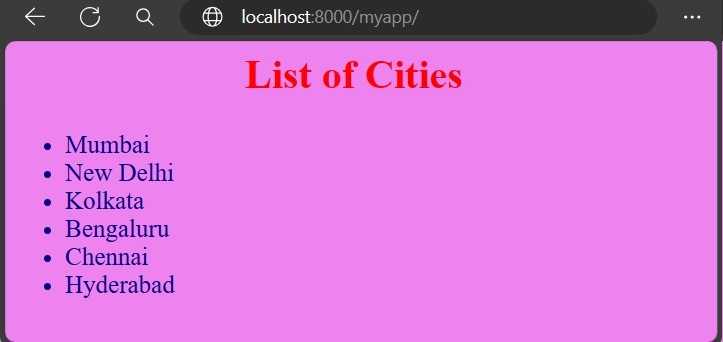
http://localhost:8000/myapp/ URL 将根据上述样式显示城市列表 −