Groovy - 线程生命周期
线程的生命周期
Groovy 中线程的生命周期指的是线程经历的各种状态。例如,线程被创建、启动、运行,然后终止。Thread class 定义了线程的生命周期及其各种状态。
线程生命周期流程图
下图展示了线程的完整生命周期。
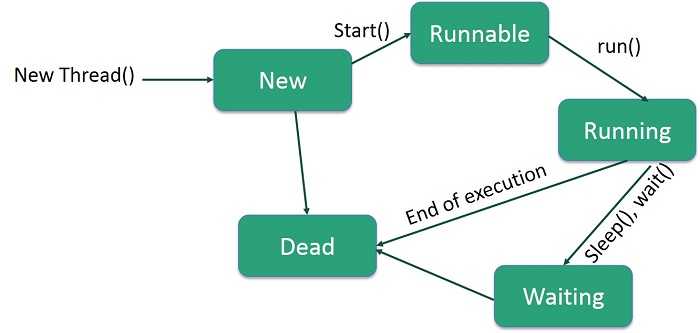
线程生命周期的状态
以下是生命周期的各个阶段 −
New − 新线程在其生命周期开始时处于 new 状态。程序启动线程之前,它一直保持在此状态。也称为born thread。
Runnable − 新生线程启动后,线程变为 runnable 状态。此状态的线程被认为正在执行其任务。
Waiting − 有时,线程在等待另一个线程执行任务时会过渡到 waiting 状态。只有当另一个线程通知等待线程继续执行时,该线程才会返回到 runnable 状态。
Timed Waiting − runnable 线程可以进入 timed waiting 状态,持续指定的时间间隔。此状态的线程在时间间隔到期或等待的事件发生时返回到 runnable 状态。
Terminated (Dead) − runnable 线程在完成任务或以其他方式终止时进入 terminated 状态。
示例 - 演示线程状态
在本示例中,我们通过扩展 Thread class 创建了两个线程。我们打印了线程的每个状态。当线程对象被创建时,其状态为 NEW;调用start() method时,状态为 START;调用run() method时,状态为 RUNNING;线程完成 run() 方法的处理后,进入 DEAD 状态。
Example.groovy
class Example {
   static void main(String[] args) {
      ThreadDemo thread1 = new ThreadDemo( "Thread-1");
      ThreadDemo thread2 = new ThreadDemo( "Thread-2");
      thread1.start();
      thread2.start();
   }
}
class ThreadDemo extends Thread {

   private Thread t;
   private String threadName;

   ThreadDemo( String name) {
      threadName = name;
      System.out.println("Thread: " + threadName + ", " + "State: New");  // 线程:ThreadName,状态:New
   }
   void run() {
      println("Thread: " + threadName + ", " + "State: Running");  // 线程:ThreadName,状态:Running
      for(int i = 4; i > 0; i--) {
         println("Thread: " + threadName + ", " + i);
      }
      println("Thread: " + threadName + ", " + "State: Dead");  // 线程:ThreadName,状态:Dead
   }
   void start () {
      println("Thread: " + threadName + ", " + "State: Start");  // 线程:ThreadName,状态:Start
      if (t == null) {
         t = new Thread (this, threadName);
         t.start ();
      }
   }
}
输出
上述程序产生以下输出 −
Thread: Thread-1, State: New
Thread: Thread-2, State: New
Thread: Thread-1, State: Start
Thread: Thread-2, State: Start
Thread: Thread-1, State: Running
Thread: Thread-2, State: Running
Thread: Thread-2, 4
Thread: Thread-2, 3
Thread: Thread-2, 2
Thread: Thread-2, 1
Thread: Thread-2, State: Dead
Thread: Thread-1, 4
Thread: Thread-1, 3
Thread: Thread-1, 2
Thread: Thread-1, 1
Thread: Thread-1, State: Dead
示例 - 检查使用 Thread 类创建的线程状态
在这个示例中,我们使用 sleep() 方法 来引入一些处理延迟,并展示使用线程的并行处理。我们通过扩展 Thread 类创建了两个线程。我们打印了线程的每个状态。当线程对象被创建时,其状态为 NEW;当调用 start() 方法时,状态为 START;当调用 run() 方法时,状态为 RUNNING;如果调用了 sleep(),则线程进入 WAITING 状态;当线程完成 run() 方法的处理后,它进入 DEAD 状态。
Example.groovy
class Example {
   static void main(String[] args) {
      ThreadDemo thread1 = new ThreadDemo( "Thread-1");
      ThreadDemo thread2 = new ThreadDemo( "Thread-2");
      thread1.start();
      thread2.start();
   }
}
class ThreadDemo extends Thread {
   private Thread t;
   private String threadName;

   ThreadDemo( String name) {
      threadName = name;
      System.out.println("Thread: " + threadName + ", " + "State: New");
   }

   void run() {
      println("Thread: " + threadName + ", " + "State: Running");
      try {
         for(int i = 4; i > 0; i--) {
            println("Thread: " + threadName + ", " + i);
            // 让线程休眠一段时间。
            println("Thread: " + threadName + ", " + "State: Waiting");
            Thread.sleep(50);
         }
      } catch (InterruptedException e) {
         println("Thread " +  threadName + " interrupted.");
      }
      println("Thread: " + threadName + ", " + "State: Dead");
   }

   void start () {
      println("Thread: " + threadName + ", " + "State: Start");
      if (t == null) {
         t = new Thread (this, threadName);
         t.start ();
      }
   }
}
输出
上述程序产生以下输出 −
Thread: Thread-1, State: New
Thread: Thread-2, State: New
Thread: Thread-1, State: Start
Thread: Thread-2, State: Start
Thread: Thread-1, State: Running
Thread: Thread-1, 4
Thread: Thread-1, State: Waiting
Thread: Thread-2, State: Running
Thread: Thread-2, 4
Thread: Thread-2, State: Waiting
Thread: Thread-1, 3
Thread: Thread-2, 3
Thread: Thread-2, State: Waiting
Thread: Thread-1, State: Waiting
Thread: Thread-2, 2
Thread: Thread-1, 2
Thread: Thread-1, State: Waiting
Thread: Thread-2, State: Waiting
Thread: Thread-2, 1
Thread: Thread-2, State: Waiting
Thread: Thread-1, 1
Thread: Thread-1, State: Waiting
Thread: Thread-2, State: Dead
Thread: Thread-1, State: Dead
示例 - 检查使用 Runnable 接口创建的 Thread 状态
在这个示例中,我们通过实现 Runnable 接口来创建两个线程。我们会打印线程的每个状态。当线程对象被创建时,其状态为 NEW;当调用 start() 方法时,状态为 START;当调用 run() 方法时,状态为 RUNNING;如果调用了 sleep(),则线程进入 WAITING 状态;当线程完成处理 run() 方法时,它进入 DEAD 状态。
Example.groovy
class Example {
   static void main(String[] args) {
      ThreadDemo thread1 = new ThreadDemo( "Thread-1");
      ThreadDemo thread2 = new ThreadDemo( "Thread-2");
      thread1.start();
      thread2.start();
   }
}
class ThreadDemo implements Runnable {
   private Thread t;
   private String threadName;
   ThreadDemo( String name) {
      threadName = name;
      println("Thread: " + threadName + ", " + "State: New");
   }
   void run() {
      println("Thread: " + threadName + ", " + "State: Running");
      try {
         for(int i = 4; i > 0; i--) {
            println("Thread: " + threadName + ", " + i);
            // 让线程休眠一段时间。
            println("Thread: " + threadName + ", " + "State: Waiting");
            Thread.sleep(50);
         }
      } catch (InterruptedException e) {
         System.out.println("Thread " +  threadName + " interrupted.");
      }
      println("Thread: " + threadName + ", " + "State: Dead");
   }

   void start () {
      println("Thread: " + threadName + ", " + "State: Start");
      if (t == null) {
         t = new Thread (this, threadName);
         t.start ();
      }
   }
}
输出
Thread: Thread-1, State: New
Thread: Thread-2, State: New
Thread: Thread-1, State: Start
Thread: Thread-2, State: Start
Thread: Thread-1, State: Running
Thread: Thread-1, 4
Thread: Thread-1, State: Waiting
Thread: Thread-2, State: Running
Thread: Thread-2, 4
Thread: Thread-2, State: Waiting
Thread: Thread-1, 3
Thread: Thread-2, 3
Thread: Thread-2, State: Waiting
Thread: Thread-1, State: Waiting
Thread: Thread-2, 2
Thread: Thread-1, 2
Thread: Thread-1, State: Waiting
Thread: Thread-2, State: Waiting
Thread: Thread-2, 1
Thread: Thread-2, State: Waiting
Thread: Thread-1, 1
Thread: Thread-1, State: Waiting
Thread: Thread-2, State: Dead
Thread: Thread-1, State: Dead