Django 插入数据
Django 拥有自己的 Object Relation Model (ORM),它将 Python class 与关系型数据库中的 table 映射。ORM 机制有助于以面向对象的方式执行 CRUD 操作。在本章中,我们将学习插入新数据的不同方法。
默认情况下,Django 使用 SQLite 数据库。Django 中的 model 是继承自 "django.db.models" class 的 class。
让我们使用以下 Dreamreal model,在 "models.py" 文件中学习如何向映射的 table 中插入数据 −
from django.db import models

class Dreamreal(models.Model):
   website = models.CharField(max_length=50)
   mail = models.CharField(max_length=50)
   name = models.CharField(max_length=50)
   phonenumber = models.IntegerField()

   class Meta:
      db_table = "dreamreal"
声明 model 后,我们需要执行 migrations −
python manage.py makemigrations
python manage.py migrate
从 Shell 插入对象
Django 提供了一个有用的功能,可以在 Django 项目环境中调用 Python shell。使用 manage.py 脚本运行 shell 命令 −
python manage.py shell
在 Python 提示符前,导入 Dreamreal model −
>>> from myapp.models import Dreamreal
我们可以构造该 class 的一个对象并调用其 save() 方法,从而在 table 中添加对应的行
>>> obj = Dreamreal(website="www.polo.com", mail="sorex@polo.com", name="sorex", phonenumber="002376970")
>>> obj.save()
我们可以通过打开任何 SQLite 查看器来查看数据库以确认此操作。
您还可以使用 model class 的 objects 属性的 create() 方法来插入记录。
>>> obj = Dreamreal.objects.create(website="www.polo.com",
mail="sorex@polo.com", name="sorex", phonenumber="002376970")
通过调用视图函数执行插入操作
现在让我们通过调用视图函数来执行插入操作。在 views.py 文件中定义 addnew() 函数,如下所示 −
from myapp.models import Dreamreal

def addnew(request):
   obj = Dreamreal(website="www.polo.com", mail="sorex@polo.com", name="sorex", phonenumber="002376970")
   obj.save()
   return HttpResponse("<h2>Record Added Successfully")
我们需要将这个视图注册到 URLpatterns 列表中。
from django.urls import path
from . import views

urlpatterns = [
   path("", views.index, name="index"),
   path("addnew/", views.addnew, name='addnew')
]
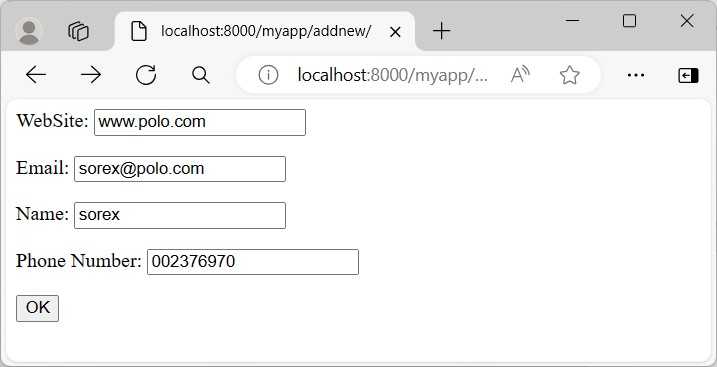
我们不希望像上面示例中使用硬编码的值,而是希望从用户那里接受数据。为此,在 myform.html 文件中创建一个 HTML 表单。
<html>
<body>
   <form action="../addnew/" method="post">
      {% csrf_token %}
      <p><label for="website">WebSite: </label>
      <input id="website" type="text" name="website"></p>
      <p><label for="mail">Email: </label>
      <input id="mail" type="text" name="mail"></p>
      <p><label for="name">Name: </label>
      <input id="name" type="text" name="name"></p>
      <p><label for="phonenumber">Phone Number: </label>
      <input id="phonenumber" type="text" name="phonenumber"></p>
      <input type="submit" value="OK">
   </form>
</body>
</html>
HTML 模板文件必须存储在 TEMPLATES 设置中定义的目录中 −
TEMPLATES = [
   {
      'BACKEND': 'django.template.backends.django.DjangoTemplates',
      'DIRS': [BASE_DIR/'templates'],
   .. . .,
]
让我们使用 render() 函数来显示表单模板 −
from django.shortcuts import render
from myapp.models import Dreamreal

def addnew(request):
   if request.method == "POST":
      ws = request.POST['website']
      mail = request.POST['mail']
      nm = request.POST['name']
      ph = request.POST['phonenumber']
      obj = Dreamreal(website=ws, mail=mail, name=nm, phonenumber=ph)
      obj.save()
      return HttpResponse("<h2>Record Added Successfully</h2>")
   return render(request, "myform.html")
注意,表单的 action 属性也设置为与 addnew() 函数相同的 URL 映射。因此,我们需要检查 request.method。如果是 GET 方法,则渲染空白表单。如果是 POST 方法,则解析表单数据并用于插入新记录。
Model Form
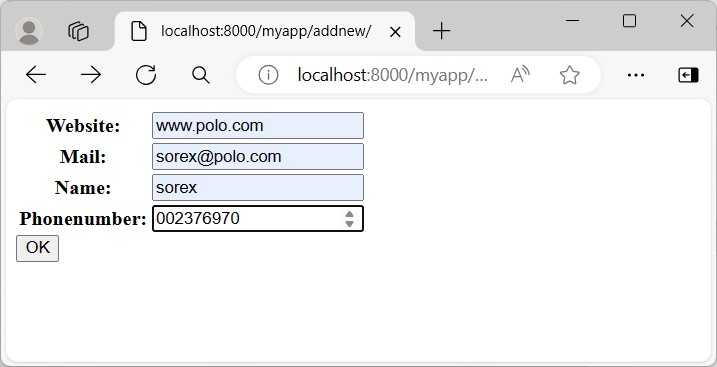
Django 有一个 ModelForm 类,它会自动渲染一个 HTML 表单,其结构与 model class 的属性匹配。
我们在 app 文件夹下的 forms.py 文件中定义一个 DreamRealForm 类,以 Dreamreal model 为基础。
from django import forms
from .models import Dreamreal

class DreamrealForm(forms.ModelForm):
   class Meta:
      model = Dreamreal
      fields = "__all__"
model form 的对象在 HTML 表单上渲染。如果请求方法是 POST,则 ModelForm 类的 save() 方法会自动验证表单并保存新记录。
from .forms import DreamrealForm
def addnew(request):
   if request.method == 'POST':
      form = DreamrealForm(request.POST)
      if form.is_valid():
         form.save()
            return HttpResponse("<h2>Book added successfully</h2>")

   context={'form' : DreamrealForm}
   return render(request, "myform.html", context)
CreateView 类
Django 定义了一系列 generic view classes。CreateView 类专门用于执行 INSERT 查询操作。
我们定义一个 CreateView 类的子类,并将其 template_name 属性设置为我们已经创建的 myform.html。
在 views.py 文件中添加以下代码 −
from django.views.generic import CreateView
class DRCreateView(CreateView):
   model = Dreamreal
   fields = "__all__"
   template_name = 'myform.html'
   success_url = '../success/'
插入成功后,浏览器将被重定向到 success() view function。
def success(request):
   return HttpResponse("<h2>Book added successfully</h2>")
上述两个 views 都必须包含在 urls.py 文件的 URL pattern 列表中。generic view classes 使用其 as_view() 方法进行注册。
from django.urls import path
from . import views
from .views import DRCreateView

urlpatterns = [
   path("", views.index, name="index"),
   path("addnew/", views.addnew, name='addnew'),
   path("add/", DRCreateView.as_view(), name='add'),
   path("success/", views.success, name='success'),
]
在本章中,我们学习了在 Django model 中插入数据的不同方式。