Angular - 嵌套路由
本章将讨论 Angular 中的 嵌套路由 和 嵌套路由配置 是什么,包括其语法、使用方法以及在实际 Angular 项目中的示例。
Angular 中的嵌套路由
在 Angular 中,嵌套路由 用于为组件定义层次化的路由。这种技术允许您仅在父组件加载时才加载特定的子组件。
例如,如果您想在 ItemsComponent 中加载所有项目,可以使用像 /items/item-lists/ 这样的路由,其中 “item-list” 嵌套在 “items routes” 之下。
当在非根组件中使用 <router-outlet> 指令时,它允许您在该组件内显示子路由,这些路由将被视为父组件的子路由。这一概念被称为 嵌套路由,可以通过实现 嵌套路由 来实现。
Angular 嵌套路由的语法
以下是在 Angular 中创建 嵌套路由 的语法 −
const routes: Routes = [
  {
    path: 'parent',
    component: ParentComponent,
    children: [
      {
        path: 'child1',
        component: Child1Component
      },
      {
        path: 'child2',
        component: Child2Component
      }
    ]
  }
];
这里,
- path: 指定路由的 URL 段。
- component: 定义路由要渲染的组件。
- children: 嵌套在父路由之下的子路由数组。
注意: 嵌套 URL 将是:"/parent/child1" 和 "/parent/child2"。
示例 - Angular 嵌套路由
下面是一个在 Angular 项目中使用 嵌套路由 的示例 −
步骤 1:为您的应用定义嵌套路由
app.routes.ts
import { Routes } from '@angular/router';
import { Home } from './home/home';
import { About } from './about/about';
import { ViewItem } from './view-item/view-item';
import { PageNotFound } from './page-not-found/page-not-found';
import { EditItem } from './edit-item/edit-item';

export const routes: Routes = [
   {path: 'home', component: Home},
   {path: 'about', component: About},
   {path: 'item', children:[
      {path: 'view/:id', component: ViewItem},
      {path: 'edit/:id', component: EditItem},
   ]},
   {path: '**', component: PageNotFound}
];
步骤 2:将路由添加到您的应用中
app.html
<h1>Angular Routing</h1>
<a routerLink="/home">Home</a><br />
<a routerLink="/about">About</a><br />
Item1: <a routerLink="/item/view/1">View Item1</a> <a routerLink="item/edit/1">Edit Item1</a><br />
Item2: <a routerLink="item/view/2">View Item2</a> <a routerLink="item/edit/2">Edit Item2</a><br />
<router-outlet></router-outlet>
步骤 3:在 ViewItem Component 和 EditItem Component 中访问 'id' 参数
view-item.ts
import { Component, OnInit } from '@angular/core';
import { ActivatedRoute, RouterOutlet } from '@angular/router';

@Component({
   selector: 'app-view-item',
   imports: [],
   templateUrl: './view-item.html',
   styleUrl: './view-item.css',
})
export class ViewItem implements OnInit{
   id: any;
   constructor(private route: ActivatedRoute){}
   ngOnInit(): void {
      this.route.paramMap.subscribe(res=>{
        this.id = res.get('id');
      });
   }
}
edit-item.ts
import { Component, OnInit } from '@angular/core';
import { ActivatedRoute, RouterOutlet } from '@angular/router';

@Component({
   selector: 'app-edit-item',
   imports: [],
   templateUrl: './edit-item.html',
   styleUrl: './edit-item.css',
})
export class EditItem implements OnInit{
   id: any;
   constructor(private route: ActivatedRoute){}
   ngOnInit(): void {
      this.route.paramMap.subscribe(res=>{
        this.id = res.get('id');
      });
   }
}
输出
现在运行应用并查看输出:
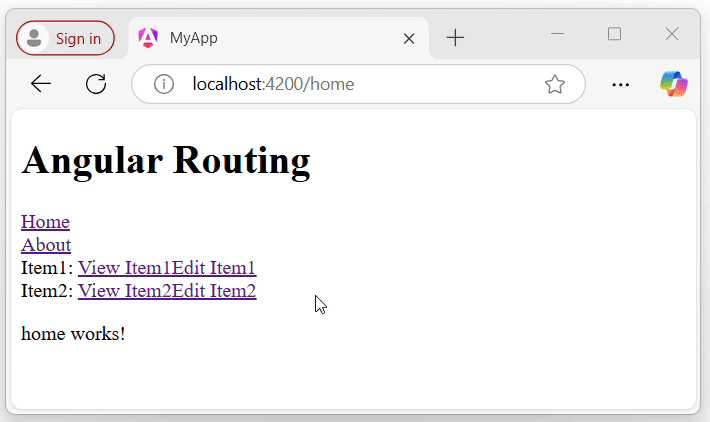
通过观察上述 GIF 中的 URL,您可以清楚地看到,只有当 Item 路由被激活时,View 和 Edit 组件才会被加载。在 Angular 上下文中,子组件(View 和 Edit)仅在父 Item 路由内渲染。