设计模式 - 桥接模式
概述
Bridge 模式用于在抽象与实现之间进行解耦,使两者可以独立变化。这种设计模式属于结构型模式,因为该模式通过在它们之间提供桥接结构来解耦实现类和抽象类。
该模式涉及一个充当桥接的 interface,使得具体类的功能独立于 interface 的实现者类。这两种类型的类都可以进行结构上的更改,而不会相互影响。
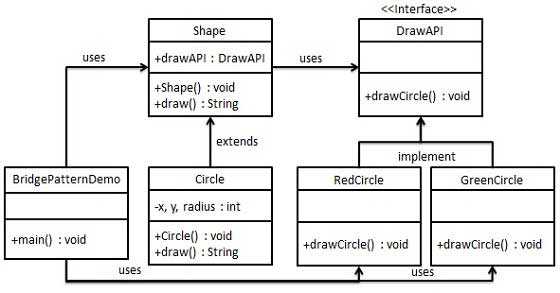
我们通过以下示例演示 Bridge 模式的使用,在该示例中,可以使用相同的抽象类方法但不同的桥接实现者类来绘制不同颜色的圆形。
实现
我们有一个 DrawAPI interface 作为桥接实现者,以及实现 DrawAPI interface 的具体类 RedCircle、GreenCircle。Shape 是一个抽象类,将使用 DrawAPI 的对象。BridgePatternDemo 是我们的演示类,将使用 Shape 类来绘制不同颜色的圆形。
步骤 1
创建桥接实现者 interface。
DrawAPI.java
package com.;

public interface DrawAPI {
   public void drawCircle(int radius, int x, int y);
}
步骤 2
创建实现 DrawAPI interface 的具体桥接实现者类。
RedCircle.java
package com.;

public class RedCircle implements DrawAPI {
   @Override
   public void drawCircle(int radius, int x, int y) {
      System.out.println("Drawing Circle[ color: red, radius: " + radius + ", x: " + x + ", " + y + "]");
   }
}
GreenCircle.java
package com.;

public class GreenCircle implements DrawAPI {
   @Override
   public void drawCircle(int radius, int x, int y) {
      System.out.println("Drawing Circle[ color: green, radius: " + radius + ", x: " + x + ", " + y + "]");
   }
}
步骤 3
使用 DrawAPI interface 创建抽象类 Shape。
Shape.java
package com.;

public abstract class Shape {
   protected DrawAPI drawAPI;

   protected Shape(DrawAPI drawAPI){
      this.drawAPI = drawAPI;
   }
   public abstract void draw();
}
步骤 4
创建实现 Shape interface 的具体类。
Circle.java
package com.;

public class Circle extends Shape {
   private int x, y, radius;

   public Circle(int x, int y, int radius, DrawAPI drawAPI) {
      super(drawAPI);
      this.x = x;
      this.y = y;
      this.radius = radius;
   }

   public void draw() {
      drawAPI.drawCircle(radius,x,y);
   }
}
示例 - Bridge Pattern 使用演示
使用 Shape 和 DrawAPI 类来绘制不同颜色的圆形。
BridgePatternDemo.java
package com.;

public class BridgePatternDemo {
   public static void main(String[] args) {
      Shape redCircle = new Circle(100,100, 10, new RedCircle());
      Shape greenCircle = new Circle(100,100, 10, new GreenCircle());

      redCircle.draw();
      greenCircle.draw();
   }
}

interface DrawAPI {
   public void drawCircle(int radius, int x, int y);
}

class RedCircle implements DrawAPI {
   @Override
   public void drawCircle(int radius, int x, int y) {
      System.out.println("Drawing Circle[ color: red, radius: " + radius + ", x: " + x + ", " + y + "]");
   }
}

class GreenCircle implements DrawAPI {
   @Override
   public void drawCircle(int radius, int x, int y) {
      System.out.println("Drawing Circle[ color: green, radius: " + radius + ", x: " + x + ", " + y + "]");
   }
}

abstract class Shape {
   protected DrawAPI drawAPI;

   protected Shape(DrawAPI drawAPI){
      this.drawAPI = drawAPI;
   }
   public abstract void draw();
}

class Circle extends Shape {
   private int x, y, radius;

   public Circle(int x, int y, int radius, DrawAPI drawAPI) {
      super(drawAPI);
      this.x = x;
      this.y = y;
      this.radius = radius;
   }

   public void draw() {
      drawAPI.drawCircle(radius,x,y);
   }
}
输出
验证输出结果。
Drawing Circle[ color: red, radius: 10, x: 100, 100]
Drawing Circle[  color: green, radius: 10, x: 100, 100]