列表和 keys
我们在前几章中学习了如何在 React 中使用 for 循环和 map function 处理集合。如果运行应用程序,它会按预期输出。如果在浏览器中打开开发者控制台,则会显示如下所示的警告 −
Warning: Each child in a list should have a unique "key" prop.
Check the render method of `ExpenseListUsingForLoop`. See https://reactjs.org/link/warning-keys for more information.
tr
ExpenseListUsingForLoop@
div
App
那么,这是什么意思,以及它如何影响我们的 React 应用程序?正如我们所知,React 通过各种机制尝试仅渲染 DOM 中更新的值。当 React 渲染一个集合时,它会尝试通过仅更新列表中已更新的项来优化渲染。
但是,React 没有提示来找出哪些项是新增的、已更新的或已删除的。为了获取这些信息,React 为所有组件允许使用 key 属性。唯一的要求是 key 的值在当前集合中必须是唯一的。
让我们重新创建一个早期的应用程序,并应用 key 属性。
create-react-app myapp
cd myapp
npm start
ExpenseListUsingForLoop.js
接下来,在 components 文件夹下创建一个组件 ExpenseListUsingForLoop(src/components/ExpenseListUsingForLoop.js)。
import React from 'react'
class ExpenseListUsingForLoop extends React.Component {
   render() {
      return <table>
         <thead>
            <tr>
               <th>Item</th>
               <th>Amount</th>
            </tr>
         </thead>
         <tbody>
         </tbody>
         <tfoot>
            <tr>
               <th>Sum</th>
               <th></th>
            </tr>
         </tfoot>
      </table>
   }
}
export default ExpenseListUsingForLoop
在这里,我们创建了一个带有 header 和 footer 的基本表格结构。然后,创建一个函数来计算总支出金额。我们将在 render method 中稍后使用它。
getTotalExpenses() {
   var items = this.props['expenses'];
   var total = 0;
   for(let i = 0; i < items.length; i++) {
      total += parseInt(items[i]);
   }
   return total;
}
在这里,getTotalExpenses 遍历 expense props 并汇总总支出。然后,在 render method 中添加 expense items 和总金额。
render() {
   var items = this.props['expenses'];
   var expenses = []
   expenses = items.map((item, idx) => <tr key={idx}><td>item {idx + 1}</td><td>{item}</td></tr>)
   var total = this.getTotalExpenses();
   return <table>
      <thead>
         <tr>
            <th>Item</th>
            <th>Amount</th>
         </tr>
      </thead>
      <tbody>
         {expenses}
      </tbody>
      <tfoot>
         <tr>
            <th>Sum</th>
            <th>{total}</th>
         </tr>
      </tfoot>
   </table>
}
在这里,
使用 map function 遍历 expense array 中的每个项,使用 transform function 为每个条目创建 table row (tr),最终将返回的数组设置到 expenses 变量中。
为每行设置 key 属性,使用项的索引值。
在 JSX 表达式中使用 expenses 数组来包含生成的行。
使用 getTotalExpenses method 计算总支出金额并将其添加到 render method 中。
ExpenseListUsingForLoop.js
ExpenseListUsingForLoop 组件的完整源代码如下 −
import React from 'react'
class ExpenseListUsingForLoop extends React.Component {
   getTotalExpenses() {
      var items = this.props['expenses'];
      var total = 0;
      for(let i = 0; i < items.length; i++) {
         total += parseInt(items[i]);
      }
      return total;
   }
   render() {
      var items = this.props['expenses'];
      var expenses = []
      expenses = items.map(
         (item, idx) => <tr key={idx}><td>item {idx + 1}</td><td>{item}</td></tr>)
      var total = this.getTotalExpenses();
      return <table>
         <thead>
            <tr>
               <th>Item</th>
               <th>Amount</th>
            </tr>
         </thead>
         <tbody>
            {expenses}
         </tbody>
         <tfoot>
            <tr>
               <th>Sum</th>
               <th>{total}</th>
            </tr>
         </tfoot>
      </table>
   }
}
export default ExpenseListUsingForLoop
App.js
接下来,使用 ExpenseListUsingForLoop 组件更新 App 组件(App.js)。
import ExpenseListUsingForLoop from './ExpenseListUsingForLoop';
import './App.css';
function App() {
   var expenses = [100, 200, 300]
   return (
      <div>
         <ExpenseListUsingForLoop expenses={expenses} />
      </div>
   );
}
export default App;
App.css
接下来,在 App.css 中添加基本的样式。
/* Center tables for demo */
table {
   margin: 0 auto;
}
div {
   padding: 5px;
}
/* Default Table Style */
table {
   color: #333;
   background: white;
   border: 1px solid grey;
   font-size: 12pt;
   border-collapse: collapse;
}
table thead th,
table tfoot th {
   color: #777;
   background: rgba(0,0,0,.1);
   text-align: left;
}
table caption {
   padding:.5em;
}
table th,
table td {
   padding: .5em;
   border: 1px solid lightgrey;
}
index.js
接下来,使用 App 组件更新 index.js。
import React from 'react';
import { createRoot } from 'react-dom/client';
import "bootstrap/dist/css/bootstrap.min.css";
import App from './components/App';

const container = document.getElementById('root');
const root = createRoot(container);
root.render(<App />);
接下来,在浏览器中检查应用程序。它将显示如下所示的支出 −
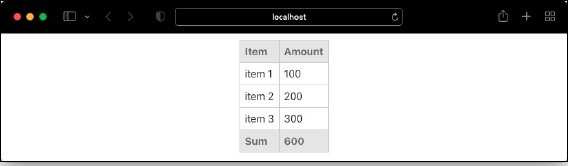
最后,打开开发者控制台,发现关于 key 的警告不再显示。
Key 和 index
我们了解到,key 应该唯一以优化组件的渲染。我们使用了 index 值,错误消失了。这仍然是为列表提供值的正确方式吗?答案是既是也不是。在大多数情况下设置 index key 会有效,但在应用中使用 uncontrolled component 时,它会以意外的方式表现。
让我们更新我们的应用,并添加以下指定的两个新功能 −
首先,添加一个 constructor 并设置应用的初始 state。由于我们将在运行时移除某些项,因此应该使用 state 而非 props。
constructor(props) {
   super(props)
   this.state = {
      expenses: this.props['expenses']
   }
}
接下来,添加一个函数来移除列表的第一个元素。
remove() {
   var itemToRemove = this.state['expenses'][0]
   this.setState((previousState) => ({
      expenses: previousState['expenses'].filter((item) => item != itemToRemove)
   }))
}
接下来,在 constructor 中绑定 remove 函数,如下所示 −
constructor(props) {
   super(props)
   this.state = {
      expenses: this.props['expenses']
   }
   this.remove = this.remove.bind(this)
}
接下来,在表格下方添加一个按钮,并在其 onClick 事件中设置 remove 函数。
render() {
   var items = this.state['expenses'];
   var expenses = []
   expenses = items.map(
      (item, idx) => <tr key={idx}><td>item {idx + 1}</td><td>{item}</td></tr>)
   var total = this.getTotalExpenses();
   return (
      <div>
         <table>
            <thead>
               <tr>
                  <th>Item</th>
                  <th>Amount</th>
               </tr>
            </thead>
            <tbody>
               {expenses}
            </tbody>
            <tfoot>
               <tr>
                  <th>Sum</th>
                  <th>{total}</th>
               </tr>
            </tfoot>
         </table>
         <div>
            <button onClick={this.remove}>Remove first item</button>
         </div>
      </div>
   )
}
接下来,在所有行的 amount 旁边添加 input 元素,如下所示 −
expenses = items.map((item, idx) => <tr key={idx}><td>item {idx + 1}</td><td>{item} <input /></td></tr>)
接下来,在浏览器中打开应用。应用将渲染如下所示 −

接下来,在第一个 input 框中输入一个金额(例如 100),然后点击“Remove first item”按钮。这将移除第一个元素,但输入的金额将填充到第二个元素(金额:200)旁边的 input 中,如下所示 −
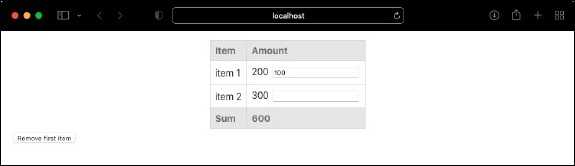
要修复这个问题,我们应该移除使用 index 作为 key 的做法。相反,我们可以使用代表该项的唯一 id。让我们将项从数字数组更改为对象数组,如下所示(App.js),
import ExpenseListUsingForLoop from './ExpenseListUsingForLoop';
import './App.css';
function App() {
   var expenses = [
      {
         id: 1,
         amount: 100
      },
      {
         id: 2,
         amount: 200
      },
      {
         id: 3,
         amount: 300
      }
   ]
   return (
      <div>
      <ExpenseListUsingForLoop expenses={expenses} />
      </div>
   );
}
export default App;
接下来,通过设置 item.id 作为 key 来更新渲染逻辑,如下所示 −
expenses = items.map((item, idx) => <tr key={item.id}><td>{item.id}</td><td>{item.amount} <input /></td></tr>)
接下来,更新 getTotalExpenses 逻辑,如下所示 −
getTotalExpenses() {
   var items = this.props['expenses'];
   var total = 0;
   for(let i = 0; i < items.length; i++) {
      total += parseInt(items[i].amount);
   }
   return total;
}
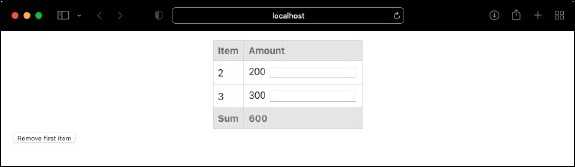
这里,我们更改了逻辑,从对象中获取金额(item[i].amount)。最后,在浏览器中打开应用并尝试重现之前的问题。在第一个 input 框中添加一个数字(例如 100),然后点击 Remove first item。现在,第一个元素被移除,而且输入的值也不会保留在下一个 input 框中,如下所示 &minuss;