Spring Boot - 使用 Eureka 进行服务注册
在本章中,您将详细学习如何将 Spring Boot 微服务应用注册到 Eureka Server 中。在注册应用之前,请确保 Eureka Server 正在端口 8761 上运行,或者首先构建并运行 Eureka Server。有关构建 Eureka Server 的更多信息,您可以参考上一章 Spring Boot - Eureka Server
示例 - 构建 Eureka Client
Eureka Client 随 Spring Cloud 捆绑提供。为此,我们需要开发 Eureka client 并将其运行在默认端口 8080 上。
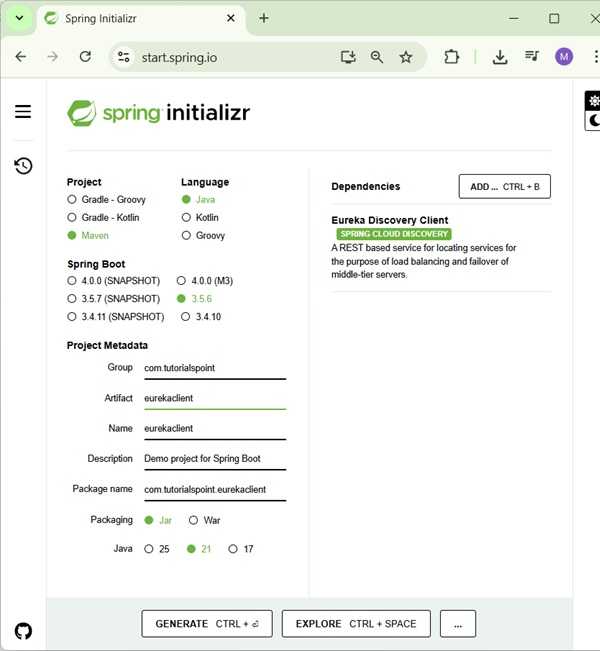
访问 Spring Initializer 主页 https://start.spring.io/ 并下载带有 Eureka Client dependency 的 Spring Boot 项目。如以下截图所示 −
下载项目后,在主 Spring Boot Application class 文件中,我们需要添加 @EnableEurekaClient 注解。@EnableEurekaClient 注解用于使您的 Spring Boot 应用程序充当 Eureka Client。
EurekaclientApplication.java
主 Spring Boot 应用程序类文件的代码如下所示 −
package com..eurekaclient;

import org.springframework.boot.SpringApplication;
import org.springframework.boot.autoconfigure.SpringBootApplication;
import org.springframework.cloud.client.discovery.EnableDiscoveryClient;

@SpringBootApplication
@EnableDiscoveryClient
public class EurekaclientApplication {
   public static void main(String[] args) {
      SpringApplication.run(EurekaclientApplication.class, args);
   }
}
确保在您的构建配置文件中添加了 Spring Cloud Eureka client dependency。
Maven 用户的 dependency 代码如下所示 −
<dependency>
<groupId>org.springframework.cloud</groupId>
   <artifactId>spring-cloud-starter-netflix-eureka-client</artifactId>
</dependency>
Gradle 用户的 dependency 代码如下所示 −
compile('org.springframework.cloud:spring-cloud-starter-netflix-eureka-client')
完整的构建配置文件如下所示 −
Maven - pom.xml
<?xml version="1.0" encoding="UTF-8"?>
<project xmlns="http://maven.apache.org/POM/4.0.0" xmlns:xsi="http://www.w3.org/2001/XMLSchema-instance"
   xsi:schemaLocation="http://maven.apache.org/POM/4.0.0 https://maven.apache.org/xsd/maven-4.0.0.xsd">
   <modelVersion>4.0.0</modelVersion>
   <parent>
      <groupId>org.springframework.boot</groupId>
      <artifactId>spring-boot-starter-parent</artifactId>
      <version>3.5.6</version>
      <relativePath/> <!-- lookup parent from repository -->
   </parent>
   <groupId>com.</groupId>
   <artifactId>eurekaserver</artifactId>
   <version>0.0.1-SNAPSHOT</version>
   <name>eurekaserver</name>
   <description>Demo project for Spring Boot</description>
   <url/>
   <licenses>
      <license/>
   </licenses>
   <developers>
      <developer/>
   </developers>
   <scm>
      <connection/>
      <developerConnection/>
      <tag/>
      <url/>
   </scm>
   <properties>
      <java.version>21</java.version>
      <spring-cloud.version>2025.0.0</spring-cloud.version>
   </properties>
   <dependencies>
      <dependency>
         <groupId>org.springframework.cloud</groupId>
         <artifactId>spring-cloud-starter-netflix-eureka-client</artifactId>
      </dependency>
      <dependency>
         <groupId>org.springframework.boot</groupId>
         <artifactId>spring-boot-starter-test</artifactId>
         <scope>test</scope>
      </dependency>
      <dependency>
         <groupId>org.springframework.boot</groupId>
         <artifactId>spring-boot-starter-web</artifactId>
      </dependency>
   </dependencies>
   <dependencyManagement>
      <dependencies>
         <dependency>
            <groupId>org.springframework.cloud</groupId>
            <artifactId>spring-cloud-dependencies</artifactId>
            <version>${spring-cloud.version}</version>
            <type>pom</type>
            <scope>import</scope>
         </dependency>
      </dependencies>
   </dependencyManagement>
   <build>
      <plugins>
         <plugin>
            <groupId>org.springframework.boot</groupId>
             <artifactId>spring-boot-maven-plugin</artifactId>
         </plugin>
      </plugins>
   </build>
</project>
Gradle - build.gradle
buildscript {
   ext {
      springBootVersion = '3.5.6'
   }
   repositories {
      mavenCentral()
   }
   dependencies {
      classpath("org.springframework.boot:spring-boot-gradle-plugin:${springBootVersion}")
   }
}

apply plugin: 'java'
apply plugin: 'eclipse'
apply plugin: 'org.springframework.boot'

group = 'com.'
version = '0.0.1-SNAPSHOT'
sourceCompatibility = 21

repositories {
   mavenCentral()
}
ext {
   springCloudVersion = '2025.0.0'
}
dependencies {
   compile('org.springframework.cloud:spring-cloud-starter-eureka-client')
   testCompile('org.springframework.boot:spring-boot-starter-test')
}
dependencyManagement {
   imports {
      mavenBom "org.springframework.cloud:spring-cloud-dependencies:${springCloudVersion}"
   }
}
为了将 Spring Boot 应用程序注册到 Eureka Server,我们需要在 application.properties 文件或 application.yml 文件中添加以下配置,并指定 Eureka Server URL。
application.yml
application.yml 文件的代码如下所示 −
eureka:
   client:
      serviceUrl:
         defaultZone: http://localhost:8761/eureka
      instance:
      preferIpAddress: true
spring:
   application:
      name: eurekaclient
application.properties
application.properties 文件的代码如下所示 −
eureka.client.serviceUrl.defaultZone  = http://localhost:8761/eureka
eureka.client.instance.preferIpAddress = true
spring.application.name = eurekaclient
现在,在主 Spring Boot 应用程序中添加返回 String 的 Rest Endpoint,并在构建配置文件中添加 Spring Boot Starter web dependency。查看以下代码 −
EurekaclientApplication.java
package com..eurekaclient;

import org.springframework.boot.SpringApplication;
import org.springframework.boot.autoconfigure.SpringBootApplication;
import org.springframework.cloud.client.discovery.EnableDiscoveryClient;
import org.springframework.web.bind.annotation.GetMapping;
import org.springframework.web.bind.annotation.RestController;

@SpringBootApplication
@EnableDiscoveryClient
@RestController
public class EurekaclientApplication {

   public static void main(String[] args) {
      SpringApplication.run(EurekaclientApplication.class, args);
   }

   @GetMapping(value = "/")
   public String home() {
      return "Eureka Client application";
   }
}
输出
您可以创建可执行的 JAR 文件,并使用以下 Maven 或 Gradle 命令运行 Spring Boot 应用程序 −
对于 Maven,可以使用以下命令 −
mvn clean install
"BUILD SUCCESS" 后,您可以在 target 目录下找到 JAR 文件。
对于 Gradle,可以使用以下命令 −
gradle clean build
"BUILD SUCCESSFUL" 后,您可以在 build/libs 目录下找到 JAR 文件。
现在,使用以下命令运行 JAR 文件 −
java jar <JARFILE>
现在,应用程序已在 Tomcat 端口 8080 上启动,并且 Eureka Client 应用程序已注册到 Eureka Server,如下所示 −
  .   ____          _            __ _ _
 /\\ / ___'_ __ _ _(_)_ __  __ _ \ \ \ \
( ( )\___ | '_ | '_| | '_ \/ _` | \ \ \ \
 \\/  ___)| |_)| | | | | || (_| |  ) ) ) )
  '  |____| .__|_| |_|_| |_\__, | / / / /
 =========|_|==============|___/=/_/_/_/

 :: Spring Boot ::                (v3.5.6)

2025-09-29T13:01:11.017+05:30  INFO 10900 --- [eurekaserver] [           main] c.t.e.EurekaserverApplication            : Starting EurekaserverApplication using Java 21.0.6 with PID 10900 (D:\Projects\eurekaserver\target\classes started by mahes in D:\Projects\eurekaserver)
2025-09-29T13:01:11.020+05:30  INFO 10900 --- [eurekaserver] [           main] c.t.e.EurekaserverApplication            : No active profile set, falling back to 1 default profile: "default"
2025-09-29T13:01:12.509+05:30  INFO 10900 --- [eurekaserver] [           main] o.s.cloud.context.scope.GenericScope     : BeanFactory id=37b0aecd-4feb-3fa0-b028-b62a23271b1d
2025-09-29T13:01:12.915+05:30  INFO 10900 --- [eurekaserver] [           main] o.s.b.w.embedded.tomcat.TomcatWebServer  : Tomcat initialized with port 8761 (http)
2025-09-29T13:01:12.931+05:30  INFO 10900 --- [eurekaserver] [           main] o.apache.catalina.core.StandardService   : Starting service [Tomcat]
2025-09-29T13:01:12.931+05:30  INFO 10900 --- [eurekaserver] [           main] o.apache.catalina.core.StandardEngine    : Starting Servlet engine: [Apache Tomcat/10.1.46]
2025-09-29T13:01:13.001+05:30  INFO 10900 --- [eurekaserver] [           main] o.a.c.c.C.[Tomcat].[localhost].[/]       : Initializing Spring embedded WebApplicationContext
2025-09-29T13:01:13.002+05:30  INFO 10900 --- [eurekaserver] [           main] w.s.c.ServletWebServerApplicationContext : Root WebApplicationContext: initialization completed in 1918 ms
2025-09-29T13:01:13.933+05:30  INFO 10900 --- [eurekaserver] [           main] c.n.d.provider.DiscoveryJerseyProvider   : Using JSON encoding codec LegacyJacksonJson
2025-09-29T13:01:13.934+05:30  INFO 10900 --- [eurekaserver] [           main] c.n.d.provider.DiscoveryJerseyProvider   : Using JSON decoding codec LegacyJacksonJson
2025-09-29T13:01:14.158+05:30  INFO 10900 --- [eurekaserver] [           main] c.n.d.provider.DiscoveryJerseyProvider   : Using XML encoding codec XStreamXml
2025-09-29T13:01:14.158+05:30  INFO 10900 --- [eurekaserver] [           main] c.n.d.provider.DiscoveryJerseyProvider   : Using XML decoding codec XStreamXml
2025-09-29T13:01:14.348+05:30  INFO 10900 --- [eurekaserver] [           main] o.s.v.b.OptionalValidatorFactoryBean     : Failed to set up a Bean Validation provider: jakarta.validation.NoProviderFoundException: Unable to create a Configuration, because no Jakarta Bean Validation provider could be found. Add a provider like Hibernate Validator (RI) to your classpath.
2025-09-29T13:01:15.060+05:30  WARN 10900 --- [eurekaserver] [           main] iguration$LoadBalancerCaffeineWarnLogger : Spring Cloud LoadBalancer is currently working with the default cache. While this cache implementation is useful for development and tests, it's recommended to use Caffeine cache in production.You can switch to using Caffeine cache, by adding it and org.springframework.cache.caffeine.CaffeineCacheManager to the classpath.
2025-09-29T13:01:15.095+05:30  INFO 10900 --- [eurekaserver] [           main] o.s.c.n.eureka.InstanceInfoFactory       : Setting initial instance status as: STARTING
2025-09-29T13:01:15.131+05:30  INFO 10900 --- [eurekaserver] [           main] com.netflix.discovery.DiscoveryClient    : Initializing Eureka in region us-east-1
2025-09-29T13:01:15.131+05:30  INFO 10900 --- [eurekaserver] [           main] com.netflix.discovery.DiscoveryClient    : Client configured to neither register nor query for data.
2025-09-29T13:01:15.135+05:30  INFO 10900 --- [eurekaserver] [           main] com.netflix.discovery.DiscoveryClient    : Discovery Client initialized at timestamp 1759131075133 with initial instances count: 0
2025-09-29T13:01:15.212+05:30  INFO 10900 --- [eurekaserver] [           main] c.n.eureka.DefaultEurekaServerContext    : Initializing ...
2025-09-29T13:01:15.215+05:30  INFO 10900 --- [eurekaserver] [           main] c.n.eureka.cluster.PeerEurekaNodes       : Adding new peer nodes [http://localhost:8761/eureka/]
2025-09-29T13:01:15.354+05:30  INFO 10900 --- [eurekaserver] [           main] c.n.d.provider.DiscoveryJerseyProvider   : Using JSON encoding codec LegacyJacksonJson
2025-09-29T13:01:15.355+05:30  INFO 10900 --- [eurekaserver] [           main] c.n.d.provider.DiscoveryJerseyProvider   : Using JSON decoding codec LegacyJacksonJson
2025-09-29T13:01:15.355+05:30  INFO 10900 --- [eurekaserver] [           main] c.n.d.provider.DiscoveryJerseyProvider   : Using XML encoding codec XStreamXml
2025-09-29T13:01:15.355+05:30  INFO 10900 --- [eurekaserver] [           main] c.n.d.provider.DiscoveryJerseyProvider   : Using XML decoding codec XStreamXml
2025-09-29T13:01:15.414+05:30  INFO 10900 --- [eurekaserver] [           main] c.n.eureka.cluster.PeerEurekaNodes       : Replica node URL:  http://localhost:8761/eureka/
2025-09-29T13:01:15.435+05:30  INFO 10900 --- [eurekaserver] [           main] c.n.e.registry.AbstractInstanceRegistry  : Finished initializing remote region registries. All known remote regions: []
2025-09-29T13:01:15.435+05:30  INFO 10900 --- [eurekaserver] [           main] c.n.eureka.DefaultEurekaServerContext    : Initialized
2025-09-29T13:01:15.451+05:30  INFO 10900 --- [eurekaserver] [           main] o.s.b.a.e.web.EndpointLinksResolver      : Exposing 1 endpoint beneath base path '/actuator'
2025-09-29T13:01:15.530+05:30  INFO 10900 --- [eurekaserver] [           main] o.s.c.n.e.s.EurekaServiceRegistry        : Registering application EUREKASERVER with eureka with status UP
2025-09-29T13:01:15.546+05:30  INFO 10900 --- [eurekaserver] [       Thread-9] o.s.c.n.e.server.EurekaServerBootstrap   : isAws returned false
2025-09-29T13:01:15.547+05:30  INFO 10900 --- [eurekaserver] [       Thread-9] o.s.c.n.e.server.EurekaServerBootstrap   : Initialized server context
2025-09-29T13:01:15.547+05:30  INFO 10900 --- [eurekaserver] [       Thread-9] c.n.e.r.PeerAwareInstanceRegistryImpl    : Got 1 instances from neighboring DS node
2025-09-29T13:01:15.548+05:30  INFO 10900 --- [eurekaserver] [       Thread-9] c.n.e.r.PeerAwareInstanceRegistryImpl    : Renew threshold is: 1
2025-09-29T13:01:15.548+05:30  INFO 10900 --- [eurekaserver] [       Thread-9] c.n.e.r.PeerAwareInstanceRegistryImpl    : Changing status to UP
2025-09-29T13:01:15.554+05:30  INFO 10900 --- [eurekaserver] [       Thread-9] e.s.EurekaServerInitializerConfiguration : Started Eureka Server
2025-09-29T13:01:15.577+05:30  INFO 10900 --- [eurekaserver] [           main] o.s.b.w.embedded.tomcat.TomcatWebServer  : Tomcat started on port 8761 (http) with context path '/'
2025-09-29T13:01:15.578+05:30  INFO 10900 --- [eurekaserver] [           main] .s.c.n.e.s.EurekaAutoServiceRegistration : Updating port to 8761
2025-09-29T13:01:15.602+05:30  INFO 10900 --- [eurekaserver] [           main] c.t.e.EurekaserverApplication            : Started EurekaserverApplication in 5.105 seconds (process running for 5.825)
2025-09-29T13:02:15.550+05:30  INFO 10900 --- [eurekaserver] [a-EvictionTimer] c.n.e.registry.AbstractInstanceRegistry  : Running the evict task with compensationTime 0ms
2025-09-29T13:03:15.550+05:30  INFO 10900 --- [eurekaserver] [a-EvictionTimer] c.n.e.registry.AbstractInstanceRegistry  : Running the evict task with compensationTime 0ms
2025-09-29T13:03:47.823+05:30  INFO 10900 --- [eurekaserver] [nio-8761-exec-1] o.a.c.c.C.[Tomcat].[localhost].[/]       : Initializing Spring DispatcherServlet 'dispatcherServlet'
2025-09-29T13:03:47.824+05:30  INFO 10900 --- [eurekaserver] [nio-8761-exec-1] o.s.web.servlet.DispatcherServlet        : Initializing Servlet 'dispatcherServlet'
2025-09-29T13:03:47.825+05:30  INFO 10900 --- [eurekaserver] [nio-8761-exec-1] o.s.web.servlet.DispatcherServlet        : Completed initialization in 1 ms
2025-09-29T13:03:48.087+05:30  INFO 10900 --- [eurekaserver] [nio-8761-exec-2] c.n.e.registry.AbstractInstanceRegistry  : Registered instance EUREKACLIENT/Home:eurekaclient with status UP (replication=false)
2025-09-29T13:03:48.778+05:30  INFO 10900 --- [eurekaserver] [nio-8761-exec-3] c.n.e.registry.AbstractInstanceRegistry  : Registered instance EUREKACLIENT/Home:eurekaclient with status UP (replication=true)
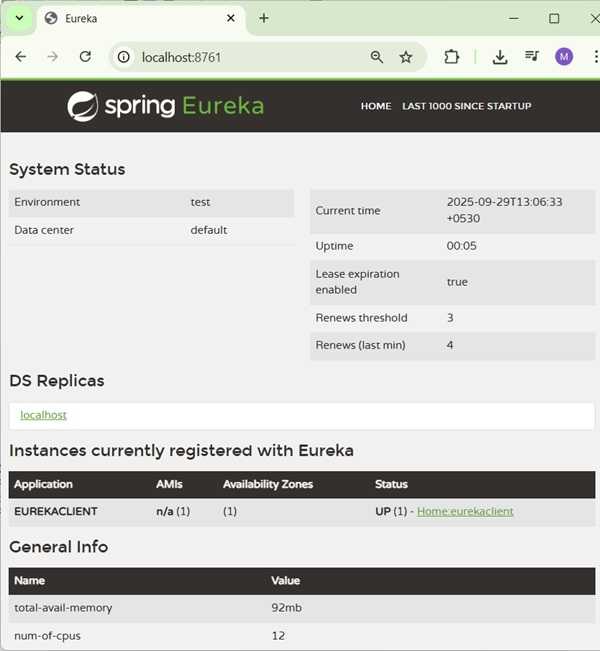
在您的网页浏览器中访问 URL http://localhost:8761/,您可以看到 Eureka Client 应用程序已注册到 Eureka Server。
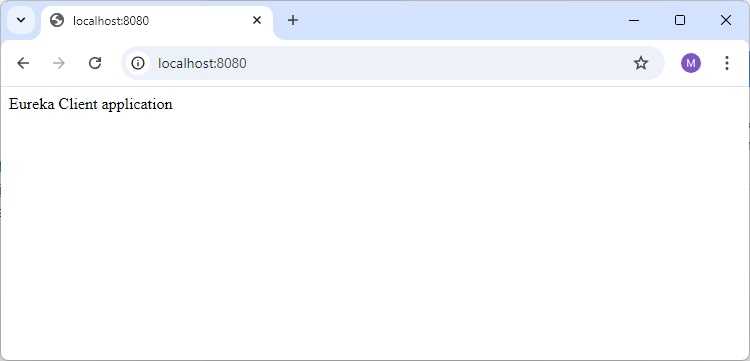
现在在您的网页浏览器中访问 URL http://localhost:8080/ 并查看 Rest Endpoint 的输出。