Spring Boot - Thymeleaf
Thymeleaf 是一个基于 Java 的库,用于创建 Web 应用程序。它为 Web 应用程序提供良好的 XHTML/HTML5 服务支持。在本章中,您将详细了解 Thymeleaf。
Thymeleaf 模板
Thymeleaf 将您的文件转换为格式良好的 XML 文件。它包含以下 6 种类型的模板:
- XML
- Valid XML
- XHTML
- Valid XHTML
- HTML5
- Legacy HTML5
除了 Legacy HTML5 之外,所有模板都引用格式良好且有效的 XML 文件。Legacy HTML5 允许我们在 Web 页面中渲染 HTML5 标签,包括未闭合的标签。
Web 应用
你可以使用 Thymeleaf 模板在 Spring Boot 中创建 Web 应用。使用 Thymeleaf 在 Spring Boot 中创建 Web 应用需要遵循以下步骤。
使用以下代码创建一个 @Controller 类文件,将 Request URI 重定向到 HTML 文件 −
WebController.java
package com..demo.controller;

import org.springframework.stereotype.Controller;
import org.springframework.web.bind.annotation.GetMapping;

@Controller
public class WebController {
   @GetMapping(value = "/index")
   public String index() {
      return "index";
   }
}
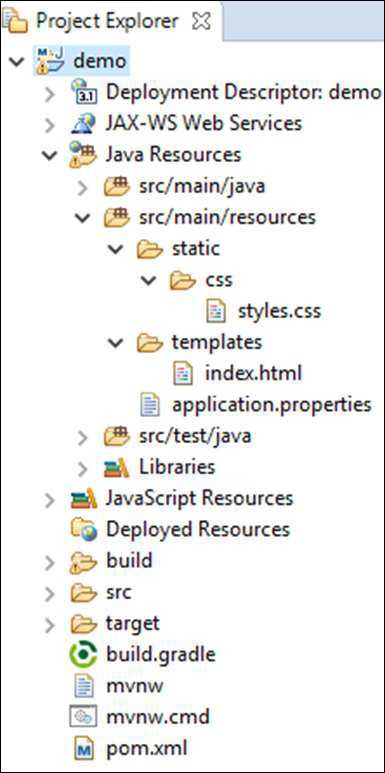
在上面的示例中,request URI 是 /index,控制权被重定向到 index.html 文件。请注意,index.html 文件应放置在 templates 目录下,所有 JS 和 CSS 文件应放置在 classpath 中的 static 目录下。在所示示例中,我们使用了 CSS 文件来更改文本颜色。
你可以使用以下代码,并在单独的文件夹 src/main/resources/static/css 中创建一个 CSS 文件,并将其命名为 styles.css −
styles.css
h4 {
   color: red;
}
index.html 文件(位于 src/main/resources/static/templates 文件夹下)的代码如下 −
<!DOCTYPE html>
<html>
   <head>
      <meta charset = "ISO-8859-1" />
      <link href = "css/styles.css" rel = "stylesheet"/>
      <title>Spring Boot Application</title>
   </head>
   <body>
      <h4>Welcome to Thymeleaf Spring Boot web application</h4>
   </body>
</html>
项目资源管理器截图如下所示 −
现在,我们需要在构建配置文件中添加 Spring Boot Starter Thymeleaf 依赖。
Maven 用户可以在 pom.xml 文件中添加以下依赖 −
<dependency>
   <groupId>org.springframework.boot</groupId>
   <artifactId>spring-boot-starter-thymeleaf</artifactId>
</dependency>
Gradle 用户可以在 build.gradle 文件中添加以下依赖 −
compile group: 'org.springframework.boot', name: 'spring-boot-starter-thymeleaf'
主 Spring Boot 应用类文件的代码如下 −
DemoApplication.java
package com..demo;

import org.springframework.boot.SpringApplication;
import org.springframework.boot.autoconfigure.SpringBootApplication;

@SpringBootApplication
public class DemoApplication {
   public static void main(String[] args) {
      SpringApplication.run(DemoApplication.class, args);
   }
}
Maven pom.xml 的代码如下 −
pom.xml
<?xml version="1.0" encoding="UTF-8"?>
   <project xmlns="http://maven.apache.org/POM/4.0.0" xmlns:xsi="http://www.w3.org/2001/XMLSchema-instance"
   xsi:schemaLocation="http://maven.apache.org/POM/4.0.0 https://maven.apache.org/xsd/maven-4.0.0.xsd">
   <modelVersion>4.0.0</modelVersion>
   <parent>
      <groupId>org.springframework.boot</groupId>
      <artifactId>spring-boot-starter-parent</artifactId>
      <version>3.5.6</version>
      <relativePath/> <!-- lookup parent from repository -->
   </parent>
   <groupId>com.</groupId>
   <artifactId>demo</artifactId>
   <version>0.0.1-SNAPSHOT</version>
   <name>demo</name>
   <description>Demo project for Spring Boot</description>
   <url/>
   <licenses>
      <license/>
   </licenses>
   <developers>
      <developer/>
   </developers>
   <scm>
      <connection/>
      <developerConnection/>
      <tag/>
      <url/>
   </scm>
   <properties>
      <java.version>21</java.version>
   </properties>
   <dependencies>
      <dependency>
         <groupId>org.springframework.boot</groupId>
         <artifactId>spring-boot-starter-web</artifactId>
      </dependency>
      <dependency>
         <groupId>org.springframework.boot</groupId>
         <artifactId>spring-boot-starter-test</artifactId>
         <scope>test</scope>
      </dependency>
      <dependency>
         <groupId>org.springframework.boot</groupId>
         <artifactId>spring-boot-starter-thymeleaf</artifactId>
      </dependency>
   </dependencies>
   <build>
      <plugins>
         <plugin>
            <groupId>org.springframework.boot</groupId>
            <artifactId>spring-boot-maven-plugin</artifactId>
         </plugin>
      </plugins>
   </build>
</project>
Gradle build.gradle 的代码如下 −
buildscript {
   ext {
      springBootVersion = '3.5.6'
   }
   repositories {
      mavenCentral()
   }
   dependencies {
      classpath("org.springframework.boot:spring-boot-gradle-plugin:${springBootVersion}")
   }
}

apply plugin: 'java'
apply plugin: 'eclipse'
apply plugin: 'org.springframework.boot'

group = 'com.'
version = '0.0.1-SNAPSHOT'
sourceCompatibility = 21

repositories {
   mavenCentral()
}
dependencies {
   compile('org.springframework.boot:spring-boot-starter-web')
   compile group: 'org.springframework.boot', name: 'spring-boot-starter-thymeleaf'
   testCompile('org.springframework.boot:spring-boot-starter-test')
}
你可以使用以下 Maven 或 Gradle 命令创建可执行 JAR 文件并运行 Spring Boot 应用 −
对于 Maven,使用以下命令 −
mvn clean install
BUILD SUCCESS 后,你可以在 target 目录下找到 JAR 文件。
对于 Gradle,使用以下命令 −
gradle clean build
BUILD SUCCESSFUL 后,你可以在 build/libs 目录下找到 JAR 文件。
使用以下命令运行 JAR 文件 −
java jar <JARFILE>
现在,应用已在 Tomcat 端口 8080 上启动,如下所示 −
  .   ____          _            __ _ _
 /\\ / ___'_ __ _ _(_)_ __  __ _ \ \ \ \
( ( )\___ | '_ | '_| | '_ \/ _` | \ \ \ \
 \\/  ___)| |_)| | | | | || (_| |  ) ) ) )
  '  |____| .__|_| |_|_| |_\__, | / / / /
 =========|_|==============|___/=/_/_/_/

 :: Spring Boot ::                (v3.5.6)

2025-09-29T10:36:00.325+05:30  INFO 42024 --- [           main] c..demo.DemoApplication    : Starting DemoApplication using Java 21.0.6 with PID 42024 (D:\Projects\demo\target\classes started by mahes in D:\Projects\demo)
2025-09-29T10:36:00.331+05:30  INFO 42024 --- [           main] c..demo.DemoApplication    : No active profile set, falling back to 1 default profile: "default"
2025-09-29T10:36:01.680+05:30  INFO 42024 --- [           main] o.s.b.w.embedded.tomcat.TomcatWebServer  : Tomcat initialized with port 8080 (http)
2025-09-29T10:36:01.702+05:30  INFO 42024 --- [           main] o.apache.catalina.core.StandardService   : Starting service [Tomcat]
2025-09-29T10:36:01.703+05:30  INFO 42024 --- [           main] o.apache.catalina.core.StandardEngine    : Starting Servlet engine: [Apache Tomcat/10.1.46]
2025-09-29T10:36:01.778+05:30  INFO 42024 --- [           main] o.a.c.c.C.[Tomcat].[localhost].[/]       : Initializing Spring embedded WebApplicationContext
2025-09-29T10:36:01.780+05:30  INFO 42024 --- [           main] w.s.c.ServletWebServerApplicationContext : Root WebApplicationContext: initialization completed in 1385 ms
2025-09-29T10:36:02.196+05:30  WARN 42024 --- [           main] ion$DefaultTemplateResolverConfiguration : Cannot find template location: classpath:/templates/ (please add some templates, check your Thymeleaf configuration, or set spring.thymeleaf.check-template-location=false)
2025-09-29T10:36:02.337+05:30  INFO 42024 --- [           main] o.s.b.w.embedded.tomcat.TomcatWebServer  : Tomcat started on port 8080 (http) with context path '/'
2025-09-29T10:36:02.350+05:30  INFO 42024 --- [           main] c..demo.DemoApplication    : Started DemoApplication in 2.579 seconds (process running for 2.916)
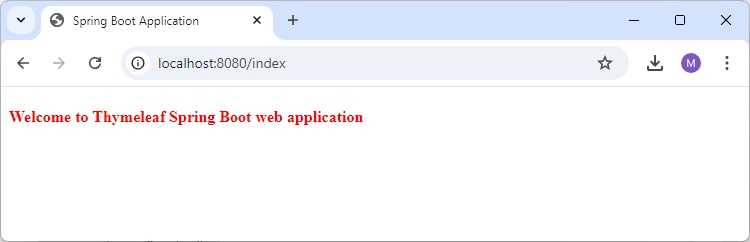
现在,在你的 Web 浏览器中访问该 URL,你可以看到如下所示的输出 −
http://localhost:8080/index