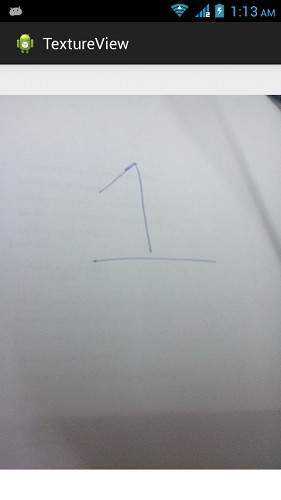
Android - TextureView
如果您想显示实时视频流或任何内容流(如视频或 OpenGL 场景),可以使用 Android 提供的 TextureView 来实现。
要使用 TextureView,您只需获取其 SurfaceTexture。然后可以使用 SurfaceTexture 来渲染内容。为此,您只需实例化该 class 的对象并实现 SurfaceTextureListener 接口。其语法如下 −
private TextureView myTexture;
public class MainActivity extends Activity implements SurfaceTextureListener{
   protected void onCreate(Bundle savedInstanceState) {
      myTexture = new TextureView(this);
      myTexture.setSurfaceTextureListener(this);
      setContentView(myTexture);
   }
}
之后,您需要重写其方法。这些方法列出如下 −
@Override
public void onSurfaceTextureAvailable(SurfaceTexture arg0, int arg1, int arg2) {
}

@Override
public boolean onSurfaceTextureDestroyed(SurfaceTexture arg0) {
}

@Override
public void onSurfaceTextureSizeChanged(SurfaceTexture arg0, int arg1,int arg2) {
}

@Override
public void onSurfaceTextureUpdated(SurfaceTexture arg0) {
}
在 texture view 中显示的任何 view 都可以通过使用 setAlpha 和 setRotation 方法来旋转并调整其 alpha 属性。其语法如下 −
myTexture.setAlpha(1.0f);
myTexture.setRotation(90.0f);
除了这些方法外,TextureView class 中还有其他可用方法。它们列出如下 −
| Sr.No | Method & description |
|---|---|
| 1 |
getSurfaceTexture() 此方法返回此 view 使用的 SurfaceTexture。 |
| 2 |
getBitmap(int width, int height) 此方法返回关联的 surface texture 内容的 Bitmap 表示。 |
| 3 |
getTransform(Matrix transform) 此方法返回与此 texture view 关联的 transform。 |
| 4 |
isOpaque() 此方法指示此 View 是否为不透明的。 |
| 5 |
lockCanvas() 此方法开始编辑 surface 中的像素 |
| 6 |
setOpaque(boolean opaque) 此方法指示此 TextureView 的内容是否为不透明的。 |
| 7 |
setTransform(Matrix transform) 此方法设置与此 texture view 关联的 transform。 |
| 8 |
unlockCanvasAndPost(Canvas canvas) 此方法完成编辑 surface 中的像素。 |
示例
下面的示例演示了 TextureView 类的使用。它创建一个基本应用程序,允许您在 texture view 中查看相机,并更改其角度、方向等。
要实验这个示例,您需要在带有相机的实际设备上运行。
| 步骤 | 描述 |
|---|---|
| 1 | 您将使用 Android Studio IDE 创建一个 Android 应用程序,并将其命名为 TextureView,包名为 com.example.textureview。 |
| 2 | 修改 src/MainActivity.java 文件以添加 Activity 代码。 |
| 3 | 修改布局 XML 文件 res/layout/activity_main.xml,必要时添加任何 GUI 组件。 |
| 5 | 运行应用程序,选择一个运行中的 Android 设备,将应用程序安装到该设备上并验证结果。 |
以下是 src/com.example.textureview/MainActivity.java 的内容。
package com.example.textureview;

import java.io.IOException;

import android.annotation.SuppressLint;
import android.app.Activity;
import android.graphics.SurfaceTexture;
import android.hardware.Camera;
import android.os.Bundle;

import android.view.Gravity;
import android.view.Menu;
import android.view.TextureView;
import android.view.TextureView.SurfaceTextureListener;
import android.view.View;
import android.widget.FrameLayout;

public class MainActivity extends Activity implements SurfaceTextureListener {
   private TextureView myTexture;
   private Camera mCamera;

   @SuppressLint("NewApi")
   @Override
   protected void onCreate(Bundle savedInstanceState) {
      super.onCreate(savedInstanceState);
      setContentView(R.layout.activity_main);

      myTexture = new TextureView(this);
      myTexture.setSurfaceTextureListener(this);
      setContentView(myTexture);
   }

   @Override
   public boolean onCreateOptionsMenu(Menu menu) {
      // Inflate the menu; this adds items to the action bar if it is present.
      // 填充菜单;如果存在,将项目添加到操作栏中。
      getMenuInflater().inflate(R.menu.main, menu);
      return true;
   }

   @SuppressLint("NewApi")
   @Override
   public void onSurfaceTextureAvailable(SurfaceTexture arg0, int arg1, int arg2) {
      mCamera = Camera.open();
      Camera.Size previewSize = mCamera.getParameters().getPreviewSize();

      myTexture.setLayoutParams(new FrameLayout.LayoutParams(
      previewSize.width, previewSize.height, Gravity.CENTER));

      try {
         mCamera.setPreviewTexture(arg0);
      } catch (IOException t) {
      }

      mCamera.startPreview();
      myTexture.setAlpha(1.0f);
      myTexture.setRotation(90.0f);
   }

   @Override
   public boolean onSurfaceTextureDestroyed(SurfaceTexture arg0) {
      mCamera.stopPreview();
      mCamera.release();
      return true;
   }

   @Override
   public void onSurfaceTextureSizeChanged(SurfaceTexture arg0, int arg1,
   int arg2) {
      // TODO Auto-generated method stub
      // TODO 自动生成的方法存根
   }

   @Override
   public void onSurfaceTextureUpdated(SurfaceTexture arg0) {
      // TODO Auto-generated method stub
      // TODO 自动生成的方法存根
   }
}
以下是 activity_main.xml 的内容
<?xml version="1.0" encoding="utf-8"?>
<RelativeLayout xmlns:android="http://schemas.android.com/apk/res/android"
   xmlns:tools="http://schemas.android.com/tools"
   android:layout_width="match_parent"
   android:layout_height="match_parent"
   android:paddingBottom="@dimen/activity_vertical_margin"
   android:paddingLeft="@dimen/activity_horizontal_margin"
   android:paddingRight="@dimen/activity_horizontal_margin"
   android:paddingTop="@dimen/activity_vertical_margin"
   tools:context=".MainActivity" >

   <TextureView
      android:id="@+id/textureView1"
      android:layout_width="wrap_content"
      android:layout_height="wrap_content"
      android:layout_alignParentTop="true"
      android:layout_centerHorizontal="true" />
</RelativeLayout>
以下是 AndroidManifest.xml 的默认内容
<?xml version="1.0" encoding="utf-8"?>
<manifest xmlns:android="http://schemas.android.com/apk/res/android"
   package="com.example.textureview" >

   <uses-permission android:name="android.permission.CAMERA"/>
   <application
      android:allowBackup="true"
      android:icon="@drawable/ic_launcher"
      android:label="@string/app_name"
      android:theme="@style/AppTheme" >

      <activity
         android:name="com.example.textureview.MainActivity"
         android:label="@string/app_name" >

         <intent-filter>
            <action android:name="android.intent.action.MAIN" />
            <category android:name="android.intent.category.LAUNCHER" />
         </intent-filter>

       </activity>

   </application>
</manifest>
让我们尝试运行您的 TextureView 应用程序。我假设您已将实际的 Android 移动设备连接到计算机。要从 Android Studio 运行应用,请打开项目的一个 activity 文件,然后点击工具栏中的运行  图标。在启动应用程序之前,Android Studio 将显示以下窗口,让您选择要在哪里运行 Android 应用程序。
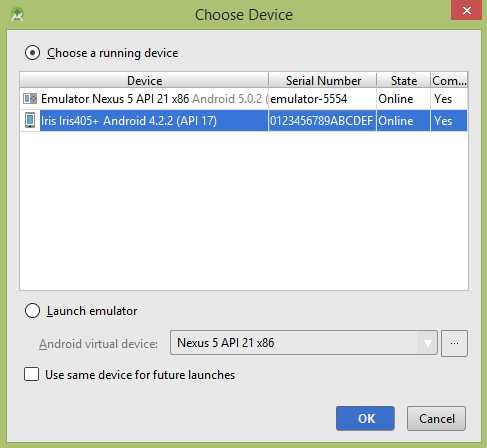
选择您的移动设备作为选项,然后检查您的移动设备,它将显示以下屏幕。此屏幕的 alpha 属性设置为 0.5,旋转设置为 45。
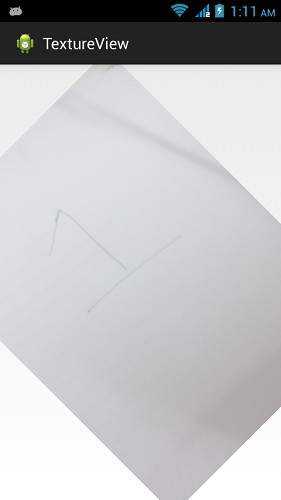
此屏幕的 alpha 属性设置为 1.5,旋转设置为 45。
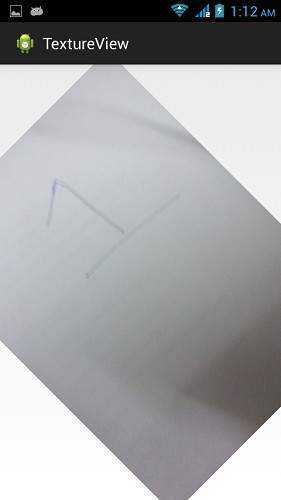
此屏幕的 alpha 属性设置为 1.0,旋转设置为 90。