Android - 活动(Activities)
Activity 表示一个带有用户界面的单一屏幕,就像 Java 的窗口或框架一样。Android activity 是 ContextThemeWrapper class 的子类。
如果你使用过 C、C++ 或 Java 编程语言,那么你一定见过程序从 main() 函数开始。同样地,Android 系统以 Activity 开始其程序,通过调用 onCreate() 回调方法启动。有序的回调方法序列用于启动一个 activity,还有有序的回调方法序列用于销毁一个 activity,如下面的 Activity 生命周期图所示:(图片来源:android.com)
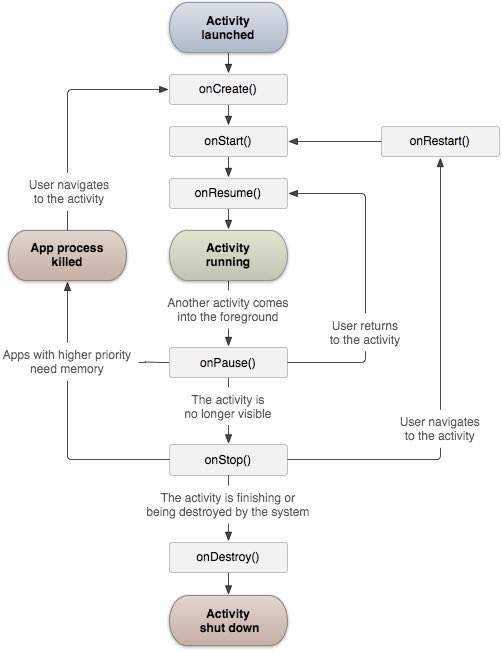
Activity class 定义了以下回调,即事件。你不需要实现所有的回调方法。但是,重要的是你理解每一个,并实现那些确保你的应用按用户预期行为的回调。
| 序号 | 回调 & 描述 |
|---|---|
| 1 |
onCreate() 这是第一个回调,当 activity 首次创建时调用。 |
| 2 | onStart() 当 activity 对用户可见时调用此回调。 |
| 3 | onResume() 当用户开始与应用交互时调用。 |
| 4 | onPause() 暂停的 activity 不会接收用户输入,也无法执行任何代码,当当前 activity 被暂停且之前的 activity 被恢复时调用。 |
| 5 | onStop() 当 activity 不再可见时调用此回调。 |
| 6 | onDestroy() 在系统销毁 activity 之前调用此回调。 |
| 7 | onRestart() 当 activity 在停止后重新启动时调用此回调。 |
示例
本示例将通过简单步骤向您展示 Android 应用程序 activity 生命周期。请按照以下步骤修改我们在 Hello World Example 章节中创建的 Android 应用程序 −
| 步骤 | 描述 |
|---|---|
| 1 | 您将使用 Android studio 创建一个 Android 应用程序,并将其命名为 HelloWorld,包名为 com.example.helloworld,如 Hello World Example 章节中所述。 |
| 2 | 按照以下说明修改主 activity 文件 MainActivity.java。其他文件保持不变。 |
| 3 | 运行应用程序以启动 Android emulator,并验证应用程序更改的结果。 |
以下是修改后的主 activity 文件 src/com.example.helloworld/MainActivity.java 的内容。该文件包含了所有基本的生命周期方法。使用了 Log.d() 方法来生成日志消息 −
package com.example.helloworld;

import android.os.Bundle;
import android.app.Activity;
import android.util.Log;

public class MainActivity extends Activity {
   String msg = "Android : ";

   /** Called when the activity is first created. */
   /** 当 activity 首次创建时调用。 */
   @Override
   public void onCreate(Bundle savedInstanceState) {
      super.onCreate(savedInstanceState);
      setContentView(R.layout.activity_main);
      Log.d(msg, "The onCreate() event");
   }

   /** Called when the activity is about to become visible. */
   /** 当 activity 即将变得可见时调用。 */
   @Override
   protected void onStart() {
      super.onStart();
      Log.d(msg, "The onStart() event");
   }

   /** Called when the activity has become visible. */
   /** 当 activity 已变得可见时调用。 */
   @Override
   protected void onResume() {
      super.onResume();
      Log.d(msg, "The onResume() event");
   }

   /** Called when another activity is taking focus. */
   /** 当另一个 activity 正在获取焦点时调用。 */
   @Override
   protected void onPause() {
      super.onPause();
      Log.d(msg, "The onPause() event");
   }

   /** Called when the activity is no longer visible. */
   /** 当 activity 不再可见时调用。 */
   @Override
   protected void onStop() {
      super.onStop();
      Log.d(msg, "The onStop() event");
   }

   /** Called just before the activity is destroyed. */
   /** 在 activity 被销毁之前调用。 */
   @Override
   public void onDestroy() {
      super.onDestroy();
      Log.d(msg, "The onDestroy() event");
   }
}
activity class 使用项目 res/layout 文件夹中的 XML 文件加载所有 UI 组件。以下语句从 res/layout/activity_main.xml file 加载 UI 组件:
setContentView(R.layout.activity_main);
应用程序可以有一个或多个 activity,没有任何限制。您为应用程序定义的每个 activity 都必须在 AndroidManifest.xml 文件中声明,并且应用程序的主 activity 必须在 manifest 中使用包含 MAIN action 和 LAUNCHER category 的 <intent-filter> 进行声明,如下所示:
<?xml version="1.0" encoding="utf-8"?>
<manifest xmlns:android="http://schemas.android.com/apk/res/android"
    package="com.example.7.myapplication">

    <application
        android:allowBackup="true"
        android:icon="@mipmap/ic_launcher"
        android:label="@string/app_name"
        android:supportsRtl="true"
        android:theme="@style/AppTheme">
        <activity android:name=".MainActivity">
            <intent-filter>
                <action android:name="android.intent.action.MAIN" />

                <category android:name="android.intent.category.LAUNCHER" />
            </intent-filter>
        </activity>
    </application>

</manifest>
如果您的某个 activity 没有声明 MAIN action 或 LAUNCHER category,那么您的应用图标将不会出现在主屏幕的应用列表中。
让我们尝试运行我们刚刚修改的 Hello World! 应用程序。我假设您在进行环境设置时已经创建了 AVD。要在 Android studio 中运行应用,请打开项目的一个 activity 文件,然后点击工具栏中的 Run  图标。Android studio 将在您的 AVD 上安装应用并启动它,如果您的设置和应用程序一切正常,它将显示 Emulator 窗口,并且您应该在 Android studio 的 LogCat 窗口中看到以下日志消息 −
08-23 10:32:07.682 4480-4480/com.example.helloworld D/Android:: The onCreate() event
08-23 10:32:07.683 4480-4480/com.example.helloworld D/Android:: The onStart() event
08-23 10:32:07.685 4480-4480/com.example.helloworld D/Android:: The onResume() event

让我们尝试点击 Android emulator 上的锁屏按钮,它将在 android studio 的 LogCat 窗口中生成以下事件消息:
08-23 10:32:53.230 4480-4480/com.example.helloworld D/Android:: The onPause() event
08-23 10:32:53.294 4480-4480/com.example.helloworld D/Android:: The onStop() event
让我们再次尝试在 Android emulator 上解锁屏幕,它将在 Android studio 的 LogCat 窗口中生成以下事件消息:
08-23 10:34:41.390 4480-4480/com.example.helloworld D/Android:: The onStart() event
08-23 10:34:41.392 4480-4480/com.example.helloworld D/Android:: The onResume() event
接下来,让我们再次尝试点击 Android emulator 上的返回按钮  ,它将在 Android studio 的 LogCat 窗口中生成以下事件消息,这完成了 Android 应用程序的 Activity 生命周期。
08-23 10:37:24.806 4480-4480/com.example.helloworld D/Android:: The onPause() event
08-23 10:37:25.668 4480-4480/com.example.helloworld D/Android:: The onStop() event
08-23 10:37:25.669 4480-4480/com.example.helloworld D/Android:: The onDestroy() event